

With or without Guix: Deploying complex software stacks on major supercomputers
How does Guix help in deploying complex HPC software stacks on
supercomputers? A common misconception is that Guix helps if and only
if it is installed on the target supercomputer. This would be a
serious limitation since, to date, you may find Guix on a number of
small- to medium-size clusters (“Tier-2”) but not yet on national and
European supercomputers (“Tier-1” and “Tier-0”). While we boasted
quite
a few
times
about the use of guix pack to run benchmarks, one might wonder how
much of it is applicable to more complex applications.
This article aims to walk you through the steps of deploying and running code with Guix on a range of Tier-1 and Tier-0 supercomputers, based on our experience with Chameleon, a dense linear algebra solver developed here at Inria. We believe it is an interesting use case for at least two reasons: for the complexity of the software stack being deployed, and for the diversity of the target supercomputers—in terms of CPUs, GPUs, and high-speed interconnect.
You wouldn’t deploy it by hand
Chameleon is a “modern” solver in that it implements its algorithms as task graphs and relies on run-time systems, typically StarPU, to schedule those tasks as efficiently as possible on the available processing units—CPUs and GPUs, possibly in a multi-node setup. This allows the algorithmic code to be largely decoupled from the minutiae not only of hardware, but also of communication and data transfers. The research goal is twofold: abstracting linear algebra code from low-level considerations and achieving performance portability.
This line of research leads to complex software stacks compared to more traditional approaches. The dependency graph of Chameleon includes not just an MPI implementation, but also the run-time support library (StarPU) and GPU support libraries (either ROCm/HIP or CUDA). Below is the build dependency graph of the HIP-enabled variant of Chameleon, limited to distance 2.
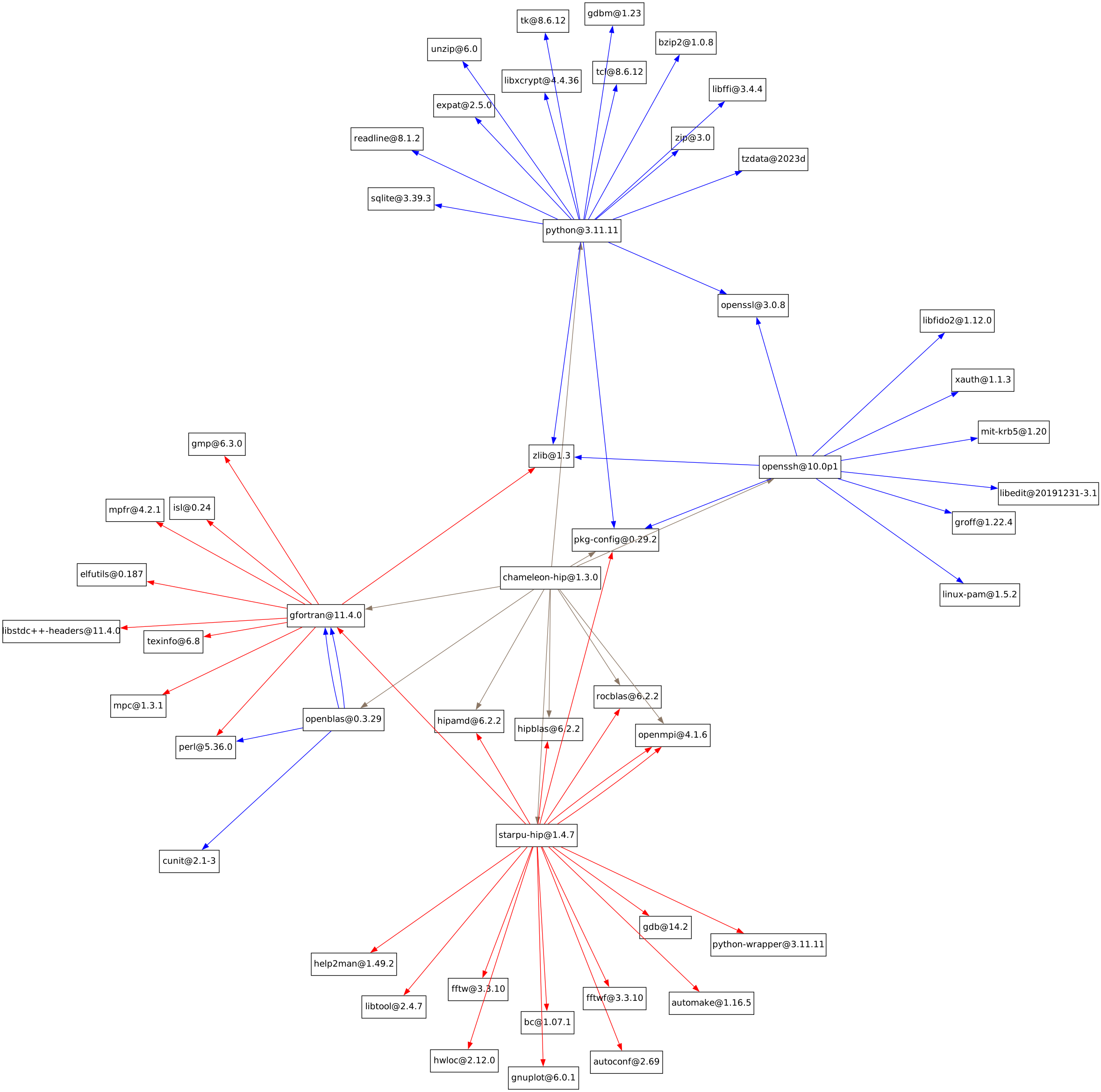
It goes without saying that deploying that by hand—building each missing package manually on the cluster—would be quite an adventure in itself. And a perilous one at that: there are many ways to get things wrong!
Packing a well-tested stack
Our workflow is to validate our software stack before we get to log in on the supercomputer:
- Continuous integration builds our packages, running unit tests, and publishes binaries.
- We deploy the stack (benefiting from binaries built in continuous integration!) on Tier-2 clusters to ensure proper hardware support—high-speed interconnects, GPUs.
What makes this workflow relatively inexpensive is that pre-built binaries are readily available and we can count on a variety of Tier-2 clusters where Guix is installed—Grid’5000 and PlaFRIM are those we commonly use, but there’s also GRICAD, GLiCID, and a bunch of others. And it’s reliable: we can run exactly the same thing that was tested in continuous integration, bit-for-bit, on any platform.
Once we have validated the software stack, we can create an application bundle that we will transfer and deploy on the target machine. At this stage, we first need to choose a variant of our software stack that corresponds to the target GPUs (NVIDIA or AMD):
For LUMI (Tier-0) and Adastra (Tier-1), which both have AMD MI250X GPUs, we’ll pick the ROCm/HIP variant.
For MeluXina (Tier-0), Vega (Tier-0), Jean-Zay (Tier-1), and Joliot-Curie (Tier-1), we’ll have to pick CUDA to support its GPUs.
Consequently we defined several variants of our chameleon package:
chameleon-hipis the HIP/ROCm-enabled variant;chameleon-cudais the CUDA-enabled variant;- additional variants swap OpenBLAS for Intel’s MKL, for example.
These machines all have different high-speed interconnects (Slingshot, Omni-Path, Infiniband) but fortunately, we do not have to worry about these: our Open MPI package adapts to the available hardware for optimal performance.
With that in mind, we can now use guix pack
to produce an application bundle. Below we combine it with
time-machine
to pin the exact package set we’re going to use as captured by our
channels.scm file. To
build a Singularity/Apptainer image for use on
LUMI or Adastra (AMD GPUs), we run:
guix time-machine -C channels.scm \
  -- pack -f squashfs chameleon-hip-mkl-mt bash \
     -r ./chameleon-hip-mkl.sif
To build an image of the CUDA variant (MeluXina, Jean-Zay, etc.):
guix time-machine -C channels.scm \
  -- pack -f squashfs chameleon-cuda-mkl-mt bash \
     -r ./chameleon-cuda-mkl.sif
In both cases, the .sif file is the image we’ll send to the
supercomputer. For some supercomputers, such as Adastra, you may find
that using a relocatable
tarball
instead of a Singularity image is more convenient due to restrictions on
Singularity usage or simply because it’s simpler; in that case, just
change the -f argument and add the -R flag (for relocatable):
guix time-machine -C channels.scm \
  -- pack -f tarball -R chameleon-hip-mkl-mt bash \
     -r ./chameleon-hip-mkl.tar.gz
(You can try the above commands at home and you’ll get the same images that we used!)
Deploying and running
Running guix pack is the easy part. As any HPC practitioner knows,
the tricky part is allocating resources appropriately for the
application at hand—and that typically depends on the specifics of the
machine, its batch scheduler, and its policies. Let’s look at a couple
of examples.
LUMI
Now that we have the image, we can copy it to the supercomputer. For LUMI, we’ll do:
scp chameleon-hip.sif lumi:On LUMI, we can run Chameleon’s built-in benchmark with the following hairy command:
export MKL_NUM_THREADS=1
srun --cpu-bind=socket -A YOUR-PROJECT-ID \
     --threads-per-core=1 --cpus-per-task=56 \
     --ntasks-per-node=1 -N 1 \
     --time=00:05:00 --partition=dev-g --mpi=pmi2 \
     --gpus-per-node=8 \
     singularity exec --rocm --bind /sys chameleon-hip-mkl.sif \
     chameleon_dtesting -o gemm -n 20000 -b 960 -P 1 -l 1 --nowarmup -g 8
Note that we use the machine’s srun command (from SLURM, the batch
scheduler) and have it invoke singularity exec to spawn our
chameleon_dtesting program on each node.
The key (and non-obvious!) options here are the following:
- Passing
--mpi=pmi2to SLURM’ssruncommand because in this particular case the stack inchameleon-hip.sifcontains Open MPI 4.x, which is using the PMI2 protocol to coordinate with the job scheduler. - Passing
--bind /sys:systosingularity execso that the host/sysdirectory is visible in the execution environment, which in turn allows hardware devices to be properly detected; likewise the--rocmflag is required to access AMD GPUs. -N 1allocates 1 node;--ntasks-per-node=1and--threads-per-core=1means we’re running one thread per core;--cpus-per-task=56lets us stick to the mandatory 56 core per node on LUMI.- Setting
MKL_NUM_THREADS=1ensures that MKL runs on a single thread since Chameleon itself implements task parallelism internally and these two things must not step on one another’s toes.
Putting it all together, the entire process for LUMI is illustrated in this short screencast:
Vega
For Vega, we’ll send our CUDA-based Singularity image:
scp chameleon-cuda-mkl.sif vega:chameleon-cuda-mkl.sifOn the machine, we’ll allocate resources to run the benchmark on 2 nodes with:
srun --exclusive --partition=gpu --gres=gpu:4 -N 2 --mpi=pmi2 \
     singularity exec --bind /tmp:/tmp chameleon-cuda.sif \
     bash -c "LD_PRELOAD=/.singularity.d/libs/libcuda.so chameleon_dtesting -o gemm -n 20000 -b 960 --nowarmup -g 4"
The highlights on this command are:
--mpi=pmi2is, as seen above, necessary for OpenMPI 4, which is what our image contains--gres=gpu:4allocates 4 GPUs per node.- Setting
LD_PRELOAD=…/libcuda.soensures thechameleon_dtestingloads the sysadmin-provided CUDA library, which is automatically mapped into the Singularity container at/.singularity.d/libs.
Putting it all together:
Going further
With or without Guix on the supercomputer, Guix enables a smooth workflow to deploy and complex HPC stacks on supercomputers, as illustrated by the MPI+GPU example of Chameleon above.
You can learn more—and see examples with other French and European supercomputers—in our NumPEx tutorial and in our tutorial for Compas, the French-speaking HPC conference. In the 2023 Guix-HPC workshop, scientist and Chameleon developer Emmanuel Agullo discussed this workflow, showing that performance is unaltered and, more importantly, that use of such packaging tools is what enables the development of more complex applications.
So what’s next? While guix pack lets us build bundles we can run on
any machine, we remain convinced that package managers need to be put in
the hands of HPC users. This would be beneficial not just for users,
who would get more flexibility, quicker deployment cycles, and access to
a wide range of packages, but also to administrators, who would be
relieved from the chore of providing users with the right scientific
software packages. As part of the Development and Integration project
of NumPEx, the
French HPC program, work in that direction is underway with national
supercomputers operators and we hope this will come to fruition soon.
Acknowledgments
Many thanks to Romain Garbage for realizing the screencasts above and to Florent Pruvost and Emmanuel Agullo for their guidance and for comments on an earlier draft of this post.
Unless otherwise stated, blog posts on this site are copyrighted by their respective authors and published under the terms of the CC-BY-SA 4.0 license and those of the GNU Free Documentation License (version 1.3 or later, with no Invariant Sections, no Front-Cover Texts, and no Back-Cover Texts).